




TiviMate vs IPTV Smarters Pro (2026)
Choosing between TiviMate and IPTV Smarters Pro? Compare interface, EPG, live TV, movies, devices, Premium, recording, and ease of use.
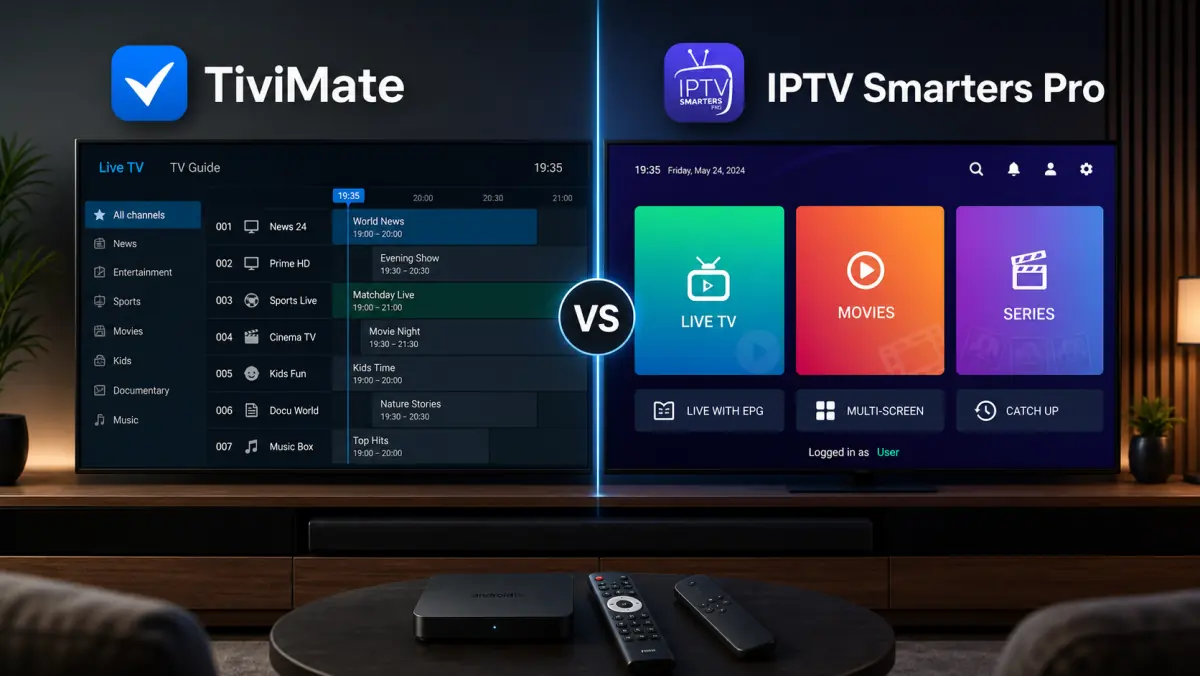
TiviMate vs IPTV Smarters Pro: Which IPTV App Is Better?
TiviMate and IPTV Smarters Pro are two of the best-known apps for playing IPTV content.
Both can display live television, films, and series. Both support common methods for adding your own account or playlist. And neither app automatically includes a television package.
However, they feel very different in everyday use.
TiviMate is designed mainly around live television. Its interface resembles a modern TV receiver, with an advanced electronic program guide, fast channel navigation, and many ways to customize groups and favorites.
IPTV Smarters Pro uses a clearer home screen where live TV, movies, and series are separated into distinct sections. This often makes the app easier for beginners and more convenient for people who watch more than live channels.
So which app is better?
That depends on your device and viewing habits.
In this detailed comparison, we evaluate TiviMate and IPTV Smarters Pro based on:
- installation;
- supported devices;
- ease of use;
- live television;
- films and series;
- electronic program guide;
- favorites and categories;
- multiple playlists;
- recording;
- catch-up;
- multiview;
- playback settings;
- free and paid features;
- performance and stability;
- privacy and security.
By the end, you will know not only which app offers more features, but which one is the better choice for your television and viewing style.
Important: TiviMate and IPTV Smarters Pro are media players. They do not normally provide channels, movies, series, or IPTV subscriptions. Only add lawfully obtained playlists and login details.
Quick Answer: TiviMate or IPTV Smarters Pro?
Do you want the practical recommendation immediately?
Choose TiviMate when you:
- mainly watch live television;
- care about a traditional TV guide;
- use Android TV or Google TV;
- want detailed control over channel groups;
- manage several playlists;
- want to use recording or multiview;
- are willing to purchase Premium for the full experience.
Choose IPTV Smarters Pro when you:
- prefer a simpler home screen;
- watch live TV, movies, and series equally;
- want video-on-demand sections to be easy to find;
- use the app across different device types;
- do not want to spend much time on advanced settings;
- want an interface that is easy for beginners.
Our general conclusion:
- Best for live TV and EPG: TiviMate
- Best for simplicity and video on demand: IPTV Smarters Pro
- Best for Android TV power users: TiviMate
- Easiest first-time experience: IPTV Smarters Pro
- Best for Samsung or LG without an external box: Whichever native app is actually available in your television’s app store
To compare additional players, read our guide to the best IPTV app for Smart TV.
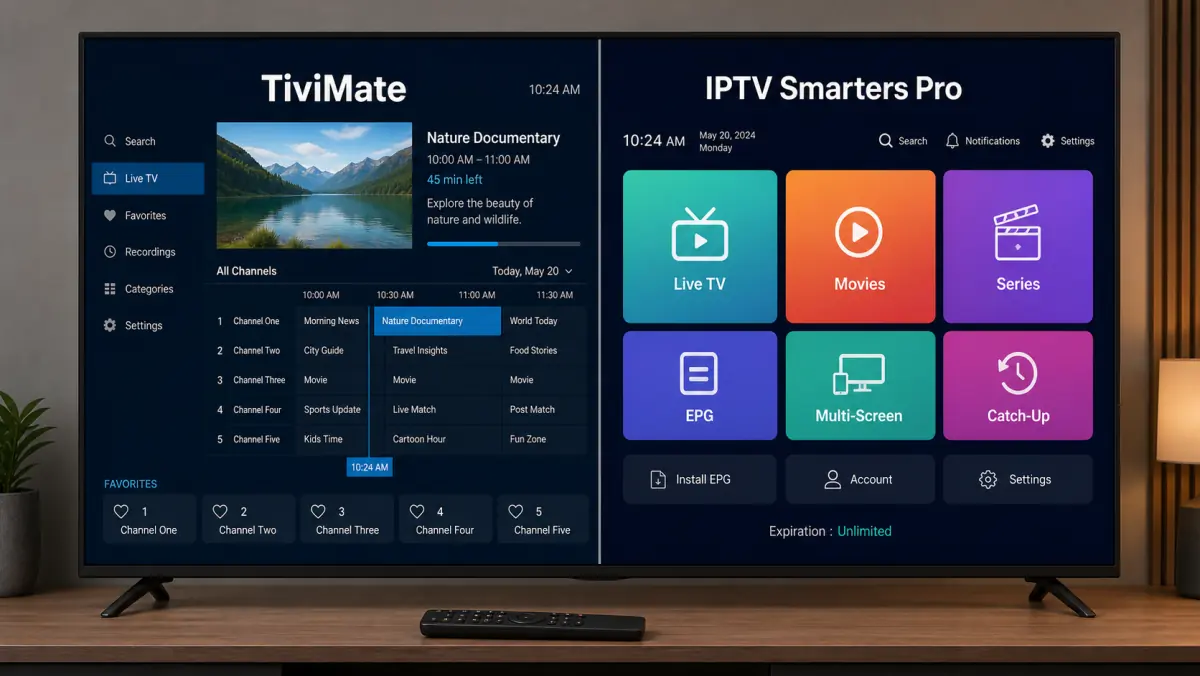
TiviMate vs IPTV Smarters Pro at a Glance
The table shows a clear pattern.
TiviMate gives advanced users more control over their television environment. Smarters Pro focuses on making all available content accessible as quickly as possible.
What Is TiviMate?
TiviMate is an IPTV media player designed for Android TV and Google TV.
The interface is strongly focused on live television.
When you open the app, you see a channel list and electronic program guide similar to the interface of a cable, satellite, or traditional IPTV receiver.
TiviMate supports common playlist methods including:
- M3U;
- Xtream Codes;
- Stalker Portal.
Depending on the version and Premium status, features may include:
- multiple playlists;
- favorites;
- hidden categories;
- reordered groups;
- custom channel names;
- catch-up;
- recording;
- multiview;
- parental controls;
- backup and restore;
- advanced EPG settings;
- external media players.
The app is not intended to be a standard mobile player.
TiviMate works best on a large television screen with a remote control.
To configure it step by step, use our guide: How to install TiviMate.
What Is IPTV Smarters Pro?
IPTV Smarters Pro is also a media player into which you add your own playlist or account.
Its home screen is different from TiviMate.
Instead of opening directly into a traditional channel guide, Smarters Pro normally separates content into clear tiles or menu sections:
- live TV;
- movies;
- series;
- catch-up;
- favorites;
- settings.
This makes it accessible to users who watch different types of content.
The name “IPTV Smarters Pro” can be confusing because several apps and versions use very similar names.
Supported features may therefore vary by:
- operating system;
- app version;
- developer;
- device;
- app store;
- license type.
Always verify the developer before entering your login details.
To set it up, read our complete guide: How to install IPTV Smarters Pro.
1. Interface and Ease of Use
The interface is the biggest difference between the two apps.
TiviMate Feels Like Traditional Television
TiviMate opens around the live-TV experience.
You can quickly:
- browse channels;
- see what is currently playing;
- view upcoming programs;
- move between channel groups;
- return to recently watched channels;
- open favorites.
For someone familiar with a traditional cable, satellite, or set-top-box interface, this feels natural.
The app contains many options, but the navigation becomes logical once you learn the main remote-control buttons.
Smarters Pro Feels Like a Streaming Dashboard
IPTV Smarters Pro usually begins with large sections for live TV, films, and series.
This feels more like a modern streaming application.
You first choose the type of content you want, then open the relevant category.
For beginners, this is easy because the home screen makes the structure immediately clear.
Which Interface Is Better?
It depends on how you watch.
If you mainly watch live Dutch channels every day, TiviMate feels faster.
If you regularly switch between live sports, movies, and series, Smarters Pro may feel more organized.
Winner for live-TV navigation: TiviMate
Winner for overall simplicity: IPTV Smarters Pro
2. Supported Devices
An app can offer excellent features, but it still needs to work on your device.
Devices for TiviMate
TiviMate is mainly intended for:
- Android TV;
- Google TV;
- Nvidia Shield;
- Chromecast with Google TV;
- Google TV Streamer;
- certified Android TV boxes;
- Amazon Fire TV through a supported installation method.
TiviMate is not available directly as a native app for Samsung Tizen or LG webOS.
To use it on those televisions, you need an external Android TV, Google TV, or Fire TV device.
Devices for IPTV Smarters Pro
Smarters Pro versions exist for several devices and platforms, including Android phones and other supported systems.
Exact availability varies.
For Samsung and LG, a compatible native version must be available in the Samsung App Store or LG Content Store. An Android APK does not run directly on Tizen or webOS.
Samsung TV
Do you own a Samsung TV without an external streaming box?
Check which native app is available in your region first.
Read our guide to choosing an IPTV app for Samsung TV for the practical options.
LG TV
The same principle applies to LG.
Review our guide to choosing an IPTV app for LG TV before installing anything.
Winner
For Android TV and Google TV: TiviMate
For use across more device types: IPTV Smarters Pro
3. Installation
Installing TiviMate
On Android TV and Google TV, you normally install TiviMate through Google Play.
On Fire TV, you may need the official APK file.
After installation, the app is ready for you to add your own playlist.
Installing IPTV Smarters Pro
On Android, you normally start in Google Play.
On other platforms, use the official app store or download offered for that version.
Because several apps use similar names, Smarters Pro requires extra attention.
Check:
- which developer published the app;
- whether it is a television or mobile version;
- which login methods it supports;
- which permissions it requests.
Which Installation Is Easier?
On Android TV, both are relatively easy to install.
TiviMate has an advantage because it is clearly positioned as an Android TV player.
The different Smarters names and versions can create more confusion.
Winner on Android TV: TiviMate
4. Watching Live Television
Live television is TiviMate’s strongest area.
TiviMate
TiviMate provides:
- fast channel switching;
- a traditional channel list;
- program information beside channels;
- recent channels;
- favorites;
- detailed group organization;
- preview options;
- viewing history;
- customizable remote-control behavior.
The exact features depend on the app version and Premium status.
IPTV Smarters Pro
Smarters Pro also includes a live-TV section.
You choose a category and then open the channel.
This works well, but usually feels less like a complete television receiver.
For people who only watch live channels occasionally, that may not matter.
Winner
TiviMate
The difference is most noticeable when you change channels frequently or rely heavily on the EPG.
5. Movies and Series
IPTV Smarters Pro has a clear presentation advantage here.
Smarters Pro
Movies and series normally have their own prominent sections on the home screen.
You may be able to browse by:
- category;
- title;
- recently added;
- search term;
- favorites.
This gives the app the feel of a combination between live television and a streaming platform.
TiviMate
TiviMate can display movies and series from a compatible playlist.
The presentation is functional, but the app remains best known for live television.
If video on demand is the most important part of your service, the Smarters interface may be more comfortable.
Winner
IPTV Smarters Pro
6. Electronic Program Guide
EPG stands for Electronic Program Guide.
A good EPG shows:
- what is playing now;
- what comes next;
- start and end times;
- descriptions;
- programming information for several days.
TiviMate EPG
TiviMate is strong in:
- clear grid view;
- fast browsing through channels and time slots;
- multiple EPG sources;
- source mapping;
- custom update settings;
- program details;
- catch-up integration when available.
The advanced settings are particularly useful when a playlist uses several or incomplete guide sources.
Smarters Pro EPG
Smarters Pro can also display a program guide.
The experience is generally simpler and sufficient for normal use.
Exact features vary more between versions and platforms.
Important Limitation
Neither app can create program information that the provider does not supply.
If your EPG source is incomplete, the guide will remain partly or completely empty.
Winner
TiviMate
7. Favorites and Channel Groups
TiviMate
TiviMate offers advanced ways to:
- collect favorite channels;
- hide groups;
- reorder groups;
- place channels in custom groups;
- rename channels;
- hide unwanted channels;
- change channel order.
Many advanced options require Premium.
IPTV Smarters Pro
Smarters Pro supports favorites and categories.
That is enough for normal use.
However, the app is less focused on completely reorganizing a very large channel list.
Winner
TiviMate
This difference becomes especially important when your playlist contains thousands of channels.
8. M3U and Xtream Codes
Both apps can support common IPTV login methods.
TiviMate
TiviMate officially supports:
- M3U;
- Xtream Codes;
- Stalker Portal.
IPTV Smarters Pro
Many Smarters versions support:
- Xtream Codes-style API login;
- M3U links;
- local or alternative playlist formats, depending on the version.
Which Method Is Better?
Xtream Codes is normally easier when you want live TV, films, series, and EPG data organized automatically.
You enter:
- server address;
- username;
- password.
M3U is widely supported and useful when you receive a complete playlist URL.
The choice between these two apps therefore does not usually depend only on M3U or Xtream support.
Draw for M3U and Xtream Codes
Advantage to TiviMate if you need Stalker Portal
9. Multiple Playlists
Multiple playlists can be useful when you:
- use several legitimate services;
- keep separate lists for household members;
- separate live TV from personal streams;
- maintain a backup source;
- organize several countries or languages.
TiviMate
Multiple playlist support is a well-known Premium feature.
You can manage the playlists inside the same interface.
IPTV Smarters Pro
Selected Smarters versions also support several playlists or user profiles.
How this works varies by platform and version.
Winner
TiviMate, especially because of its more advanced central management.
10. Catch-Up and Replay
Catch-up lets you open a program after it has already aired.
This only works when your provider and the specific channel support catch-up.
The app cannot retrieve broadcasts that were never stored by the server.
TiviMate
TiviMate integrates catch-up closely with the EPG.
When correctly configured, you can move backward through the guide and select an earlier program.
IPTV Smarters Pro
Smarters Pro may support catch-up as a separate section or within live TV.
The experience depends on the version.
Winner
TiviMate, mainly because of the integration with its program guide.
11. Recording
TiviMate
Recording is available as a Premium feature on compatible devices and setups.
You need:
- enough storage;
- write permissions;
- a stable stream;
- a device that stays active while recording;
- possibly an additional permitted connection if you watch another channel simultaneously.
Depending on the configuration, TiviMate may record to internal, USB, or network storage.
IPTV Smarters Pro
Recording support differs between Smarters versions and devices.
Not every mobile or TV version offers the same options.
Important Warning
A recording feature does not guarantee a successful recording.
A recording may stop because of:
- stream interruption;
- full storage;
- a slow USB drive;
- sleep mode;
- network loss;
- account connection limits.
Winner
TiviMate, because of its clearer television-focused recording workflow.
12. Multiview
Multiview displays several live channels at the same time.
It can be useful for:
- multiple football matches;
- Formula 1 and timing channels;
- election coverage;
- financial news;
- different camera angles.
TiviMate
TiviMate Premium provides multiview on suitable devices.
Performance depends on:
- processor;
- memory;
- internet connection;
- stream bitrate;
- number of permitted connections.
IPTV Smarters Pro
Some Smarters versions provide multi-screen or similar functions.
Availability differs by platform.
Winner
TiviMate, especially on powerful Android TV devices.
13. Playback Settings and External Players
TiviMate
TiviMate provides detailed options for:
- buffer;
- audio tracks;
- subtitles;
- aspect ratio;
- hardware decoding;
- software decoding;
- external player;
- automatic playback;
- channel-switching behavior.
IPTV Smarters Pro
Smarters Pro also offers playback options and may support external players in several versions.
The settings are usually presented more simply.
For Beginners
Too many settings can be confusing.
If playback already works well, you do not need to change the decoder or buffer.
For Troubleshooting
Advanced options are useful for:
- sound without picture;
- unsupported audio codecs;
- green or distorted video;
- brief network interruptions;
- subtitle problems.
Winner
TiviMate for control
IPTV Smarters Pro for simplicity
14. Performance and Speed
The app is only one part of the total experience.
Performance also depends on:
- television model;
- streaming box;
- available storage;
- memory;
- network;
- stream quality;
- server load;
- playlist size;
- EPG file size.
TiviMate
TiviMate normally performs smoothly on a good Android TV box or Nvidia Shield.
A very large playlist and extensive EPG data may slow older devices.
IPTV Smarters Pro
Smarters can also run smoothly, but performance varies more between app versions and platforms.
On mobile devices, Smarters has an advantage because versions with touchscreen interfaces are available.
Winner
On Android TV: TiviMate
On phones and tablets: IPTV Smarters Pro
15. Free Version and Premium Features
TiviMate
TiviMate offers a free basic version and paid Premium features.
The free version is useful for:
- testing the app;
- adding a playlist;
- evaluating the main interface.
For the full experience, including multiple playlists and advanced customization, Premium is important.
Prices and purchase options may change. Check the latest information in the official app or account environment.
IPTV Smarters Pro
Different Smarters versions and platforms may use different business models.
You may encounter:
- free use;
- advertisements;
- an app license;
- paid features;
- a one-time purchase;
- platform-specific conditions.
Check the terms of the exact app you install.
Which Is Cheaper?
There is no reliable universal answer because Smarters prices and versions differ by platform.
Do not look only at the purchase price.
Consider which features you actually need.
16. Privacy and Security
Both apps may process sensitive IPTV details, including:
- server address;
- username;
- password;
- M3U link;
- viewing history;
- device identification.
Only install official versions.
Installing TiviMate Safely
Use:
- Google Play;
- the official TiviMate website;
- the official APK when needed.
Avoid:
- cracked APK files;
- “Premium unlocked” downloads;
- unknown Downloader codes;
- websites that ask for your IPTV login before allowing a download.
Installing Smarters Pro Safely
Check carefully:
- the developer;
- the app store;
- the official website;
- privacy policy;
- requested permissions.
The Smarters name is used by several apps.
Unnecessary Permissions
An IPTV media player does not normally need access to your:
- contacts;
- text messages;
- call history;
- precise location
to play an M3U playlist.
Be careful when an app requests permissions that do not match its purpose.
17. Samsung TV: Which One Should You Choose?
You cannot install TiviMate directly on a Samsung Tizen television.
For Smarters Pro, a suitable native Tizen version must be available in the Samsung App Store.
If you do not use an external box, check which native app is actually available. On selected models, IBO Player or SmartOne IPTV may be a practical alternative.
If you connect an Android TV or Google TV box, you can choose freely between TiviMate and Smarters Pro.
Our recommendation:
- mainly live TV: TiviMate;
- simpler film-and-series interface: Smarters Pro.
18. LG TV: Which One Should You Choose?
TiviMate does not run directly on LG webOS.
Smarters Pro only works when a suitable native version is available in the LG Content Store.
Without an external box, choose from the apps supported by your specific LG model.
With an Android TV box, you have more freedom.
An external box may also perform better than the built-in smart-TV hardware of an older LG television.
19. Which App Is Better for Beginners?
IPTV Smarters Pro is usually easier for beginners.
Its home screen clearly separates:
- live TV;
- films;
- series;
- settings.
You need less knowledge of groups, EPG sources, and interface customization.
TiviMate is still accessible, but it provides many more settings.
That can feel overwhelming at first.
Winner: IPTV Smarters Pro
20. Which App Is Better for Advanced Users?
Advanced users often value:
- multiple playlists;
- custom groups;
- detailed EPG settings;
- recording;
- multiview;
- backups;
- remote-control customization;
- hiding and reordering channels.
TiviMate provides a very complete environment for this kind of use on Android TV.
Winner: TiviMate
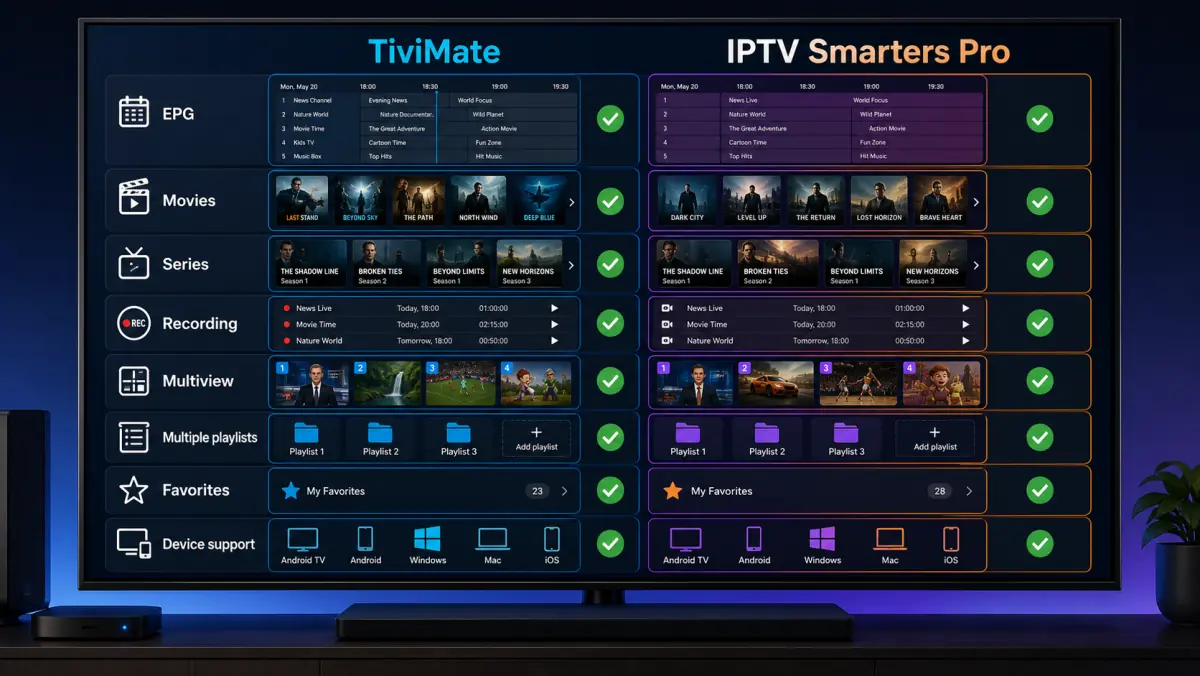
TiviMate: Advantages and Disadvantages
Advantages of TiviMate
- Excellent live-TV interface.
- Advanced electronic program guide.
- Designed for remote controls.
- Detailed favorites and group management.
- Multiple playlists with Premium.
- Recording on compatible devices.
- Multiview.
- Stalker Portal support.
- Backup and restore.
- Extensive customization.
Disadvantages of TiviMate
- Not available directly on Samsung Tizen.
- Not available directly on LG webOS.
- Not optimized for phones.
- Many useful features require Premium.
- More settings create a slightly higher learning curve.
- Recording and multiview require suitable hardware and account connections.
IPTV Smarters Pro: Advantages and Disadvantages
Advantages of IPTV Smarters Pro
- Clear home screen.
- Live TV, movies, and series are easy to locate.
- Suitable for beginners.
- Mobile versions are available.
- Supports common playlist methods.
- Often provides simple account setup.
- External-player support may be available.
- Good option for video-on-demand content.
Disadvantages of IPTV Smarters Pro
- Many apps use similar names.
- Features differ by version and platform.
- Less advanced channel-group management.
- EPG is usually less advanced than TiviMate.
- Recording and multi-screen are not equally available everywhere.
- Samsung and LG availability varies.
When Should You Choose TiviMate?
Choose TiviMate when most of these statements describe you:
- I use Android TV or Google TV.
- I mainly watch live television.
- I want a traditional program guide.
- I use many favorites.
- My playlist contains many categories.
- I want to hide or reorder groups.
- I want to manage several playlists.
- I may want to record.
- I sometimes watch several channels at once.
- I do not mind advanced settings.
TiviMate is especially strong when your television setup is intended to replace a traditional set-top box.
When Should You Choose IPTV Smarters Pro?
Choose IPTV Smarters Pro when:
- you want a simple home screen;
- you watch as many films and series as live channels;
- you want minimal configuration;
- several family members use the app;
- you also watch on a phone or tablet;
- clear content categories matter to you;
- you do not need advanced EPG management;
- you want a quick Xtream Codes or M3U login.
Smarters Pro is particularly comfortable when accessibility matters more than maximum customization.
Can You Use Both Apps?
Yes.
You can often add the same lawfully obtained account details to both apps, provided that:
- the provider permits it;
- the account is not active on too many devices at the same time;
- you respect the connection limit;
- both apps support the login method.
This is a useful way to compare them.
Test:
- The same channels.
- Channel-switching speed.
- The EPG.
- Movies and series.
- Subtitles.
- Audio tracks.
- Buffering.
- Remote-control navigation.
Close one app completely before testing the other when your account permits only one active connection.
Which App Buffers Less?
Neither app can permanently fix a poor internet connection or overloaded stream source.
Buffering depends on factors such as:
- Wi-Fi stability;
- Ethernet connection;
- bitrate;
- source server;
- device performance;
- decoder;
- buffer setting;
- active account connections.
TiviMate provides more buffer and playback settings, giving advanced users more options to test.
Smarters Pro may work better by default with a particular decoder on some devices.
There is no universal winner.
Test both apps with the same channel and connection.
If you experience regular freezing, read our guide to watching IPTV without buffering.
What If Neither App Works?
If neither TiviMate nor Smarters Pro loads channels, the app is probably not the only problem.
Check:
- Does the internet work on the device?
- Is the subscription active?
- Are the username and password correct?
- Is the server address complete?
- Is the port number missing?
- Does the playlist work on another device?
- Is the account already active elsewhere?
- Is the server temporarily unavailable?
- Is the device date and time correct?
- Is the app updated?
Use our complete troubleshooting guide: IPTV not working.
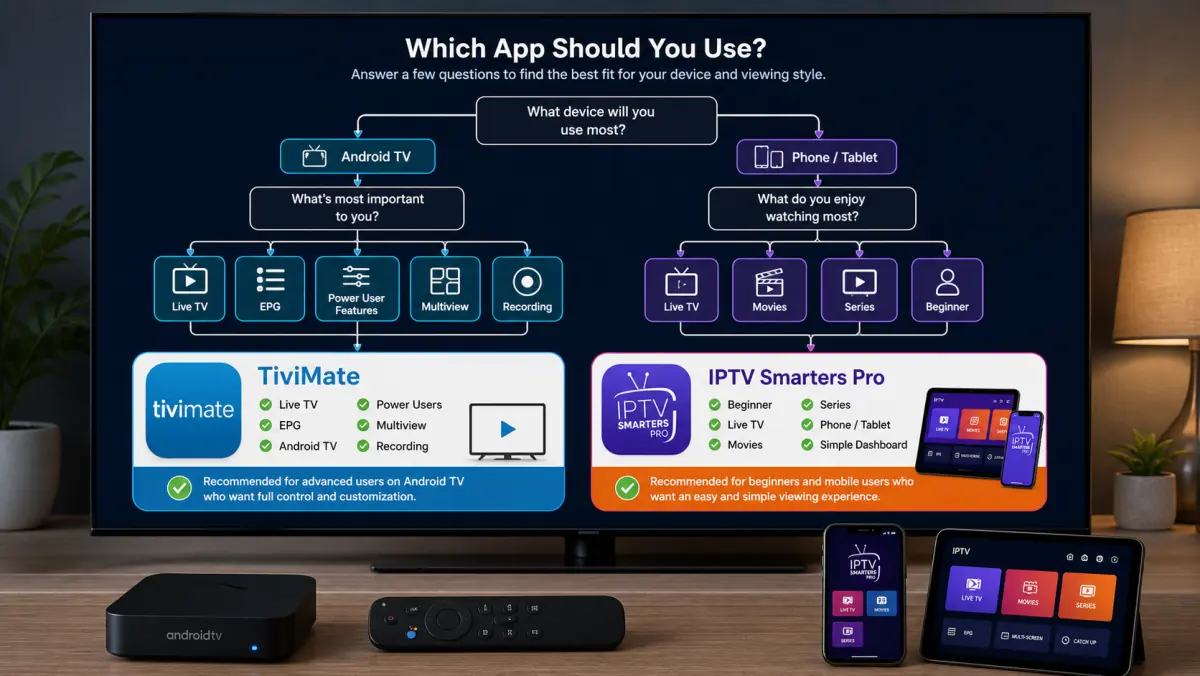
Frequently Asked Questions
Is TiviMate Better Than IPTV Smarters Pro?
TiviMate is generally better for live television, EPG, favorites, channel groups, recording, and advanced settings.
IPTV Smarters Pro is often easier for beginners and presents films and series more clearly.
Which App Is Easier to Use?
IPTV Smarters Pro is generally easier for new users.
Its home screen divides live TV, films, and series into clear sections.
Which App Has the Better EPG?
TiviMate offers the more advanced EPG experience.
The quality of the actual program information still depends on the guide source supplied by your provider.
Which App Is Better for Movies and Series?
IPTV Smarters Pro usually provides the clearer video-on-demand interface.
Which App Is Better for Live Sports?
TiviMate is often better because of its fast channel navigation, program guide, and multiview.
Your account must permit several simultaneous streams before you use multiview.
Can I Install TiviMate and Smarters Pro at the Same Time?
Yes.
Do not use both simultaneously with the same account when your subscription permits only one active connection.
Do Both Apps Support Xtream Codes?
TiviMate supports Xtream Codes.
Many Smarters Pro versions also support an Xtream Codes-style API login.
Do Both Apps Support M3U?
Yes. TiviMate supports M3U, and many Smarters versions do as well.
Can I Install TiviMate on Samsung?
Not directly on Tizen.
Use an external Android TV, Google TV, or Fire TV device.
Can I Install IPTV Smarters Pro on Samsung?
Only when a suitable native version is available in the Samsung App Store for your model and region.
Can I Install TiviMate on LG?
Not directly on webOS.
Use an external Android TV or Google TV device.
Can I Install IPTV Smarters Pro on LG?
Only when a suitable webOS version is available in the LG Content Store.
Do TiviMate or Smarters Pro Include Channels?
No.
They are media players. You need your own lawfully obtained playlist or account.
Which App Is Free?
Both may offer free features or versions.
The exact functions, advertisements, licenses, and prices vary and may change.
Is TiviMate Premium Worth It?
Premium can be worth it when you use multiple playlists, recording, multiview, custom groups, backups, and advanced settings.
For basic viewing, the free version may be enough for testing.
Which App Is Safer?
Both can be safe when you install the official version.
The main risks come from cracked APK files, unknown copies, and apps that request unnecessary permissions.
Final Verdict: Which IPTV App Wins?
There is no single winner for every user.
However, the choice is clear for specific types of use.
Choose TiviMate for:
- the best live-TV experience;
- an advanced EPG;
- Android TV and Google TV;
- favorites and channel-group management;
- recording;
- multiview;
- multiple playlists;
- detailed settings.
Choose IPTV Smarters Pro for:
- simplicity;
- a clear home screen;
- films and series;
- beginners;
- mobile-device use;
- fast access to different content types.
Our overall winner for Android TV or Google TV is TiviMate.
It provides the most complete experience when live television is the main priority.
Our winner for beginners and users who watch many films and series is IPTV Smarters Pro.
The best way to decide is to test both players using the same playlist on the same device.
At iptv-netherland.com, we help customers not only access IPTV but also complete the installation and configuration of their devices.
Would you like to compare TiviMate and IPTV Smarters Pro on your own connection?
View our IPTV subscriptions, check the Dutch IPTV channel list, or request a free trial account.
This allows you to decide which interface, program guide, and media player work best on your television.
Written by
IPTV Netherland Editorial Team
IPTV setup and streaming support
Our editorial team writes practical IPTV guides for viewers in the Netherlands, with a focus on device setup, stable streaming, app configuration, and clear troubleshooting steps.
Useful IPTV resources
Continue with the most relevant setup, channel, and subscription pages.