




M3U IPTV: What Is an M3U Link and How Do You Use It? (2026)
What is M3U IPTV? Learn how an M3U link works, how to add it to TiviMate and IPTV Smarters Pro, and how to fix EPG, login, and playback problems.
M3U IPTV: What Is an M3U Link and How Do You Use It?
Did an IPTV provider send you a long link beginning with http:// or https:// and ending with something such as type=m3u_plus?
You probably received an M3U IPTV link.
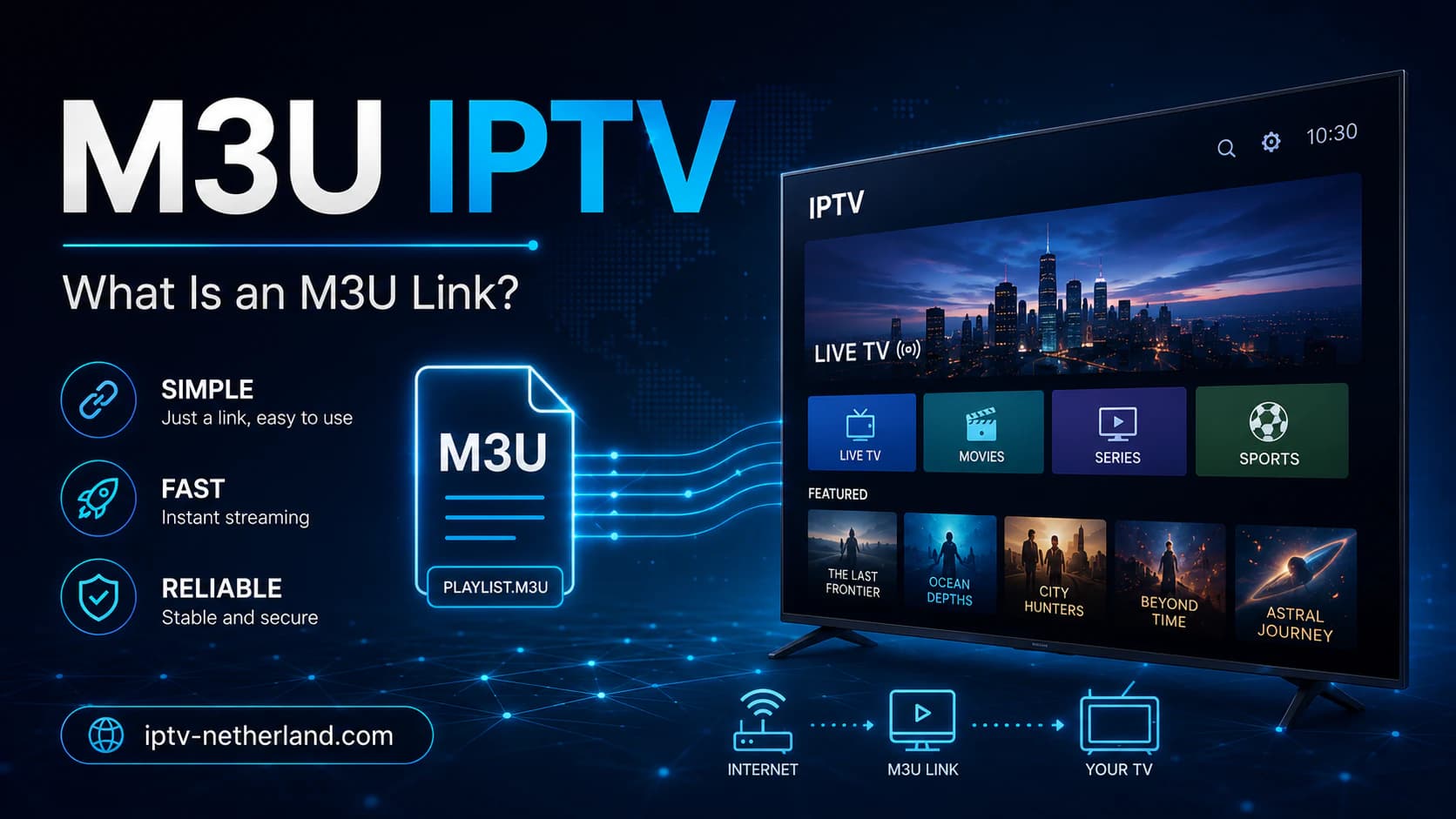
This link is not an app or a television interface. It is an address that allows a compatible media player to retrieve a list of channels, streams, and sometimes additional information.
M3U is popular because it is widely supported.
You can add an M3U link to applications such as:
- TiviMate;
- IPTV Smarters Pro;
- VLC;
- Televizo;
- selected Smart TV apps;
- Android TV and Google TV players;
- certain desktop and mobile apps.
However, users often have questions:
- What exactly is stored in an M3U link?
- Is an M3U file the same as an IPTV subscription?
- What is the difference between M3U and Xtream Codes?
- How do you add an EPG?
- Why is the channel list empty?
- Can another person use your account if the link is exposed?
- Does the same link work on several devices?
- Is M3U IPTV legal?
This guide explains everything step by step.
Important: M3U is only a playlist format. The format itself does not provide channels and says nothing about the rights to the content. Use only playlists and streams that you are authorized to access.
Quick Answer: What Is M3U IPTV?
An M3U IPTV link is an internet address that lets a media player load a list of television channels and other streams.
A technical example may look like this:
http://example-server.com/get.php?username=USER&password=PASSWORD&type=m3u_plus&output=tsThis is only an example.
Your real link may contain sensitive details such as:
- server address;
- username;
- password;
- output format;
- playlist type;
- sometimes a customer or device code.
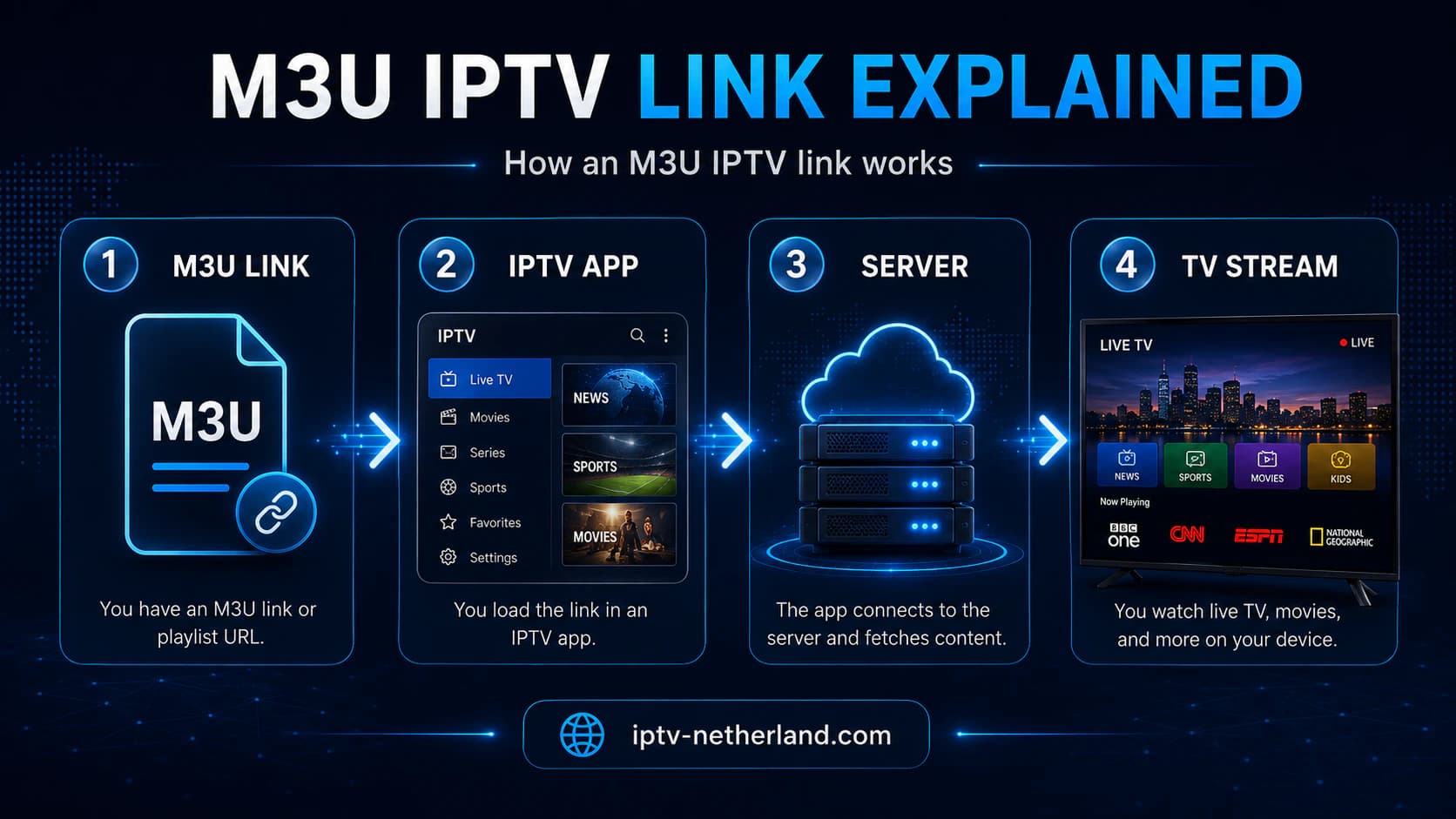
You paste the link into a compatible IPTV app. The app then retrieves the channel list and displays it through a television-friendly interface.
The three most important components are:
- The M3U link — contains or points to the playlist.
- The IPTV app — reads and organizes the playlist.
- The stream server — delivers the actual video.
If one component fails, the entire experience may stop working.
What Does M3U Mean?
M3U originally stood for MP3 URL.
The format was initially used to create playlists for audio files. It was later adopted for other media sources, including video streams.
A basic M3U file may contain lines such as:
#EXTM3U
#EXTINF:-1,Example Channel 1
https://example.com/stream1
#EXTINF:-1,Example Channel 2
https://example.com/stream2
The first line indicates that the file is an extended M3U playlist.
Each channel normally consists of:
- an information line;
- a stream address.
For IPTV, additional details may be included, such as:
- channel name;
- channel logo;
- category;
- language;
- country;
- EPG identifier;
- catch-up information.
The exact structure varies by provider.
Is M3U a File or a Link?
It can be either.
M3U File
A physical file may be named:
playlist.m3uor:
channels.m3u8You download the file and open it locally in a media player.
M3U Link
An M3U link is hosted online.
The app retrieves the current playlist through a URL.
Advantages of a link include:
- changes can be downloaded automatically;
- you do not need to download a new file every time;
- channels can be added or removed centrally;
- the app can refresh the playlist.
A local file normally stays unchanged until you replace it manually.
For IPTV, an online M3U link is therefore more common.
What Is the Difference Between M3U and M3U8?
M3U8 is essentially an M3U playlist processed using UTF-8 character encoding.
UTF-8 matters for names containing:
- accented characters;
- Arabic characters;
- Cyrillic characters;
- special symbols;
- several languages.
Most modern apps can open both .m3u and .m3u8.
In IPTV discussions, “M3U” is often used as a general term even when the playlist technically uses M3U8.
M3U8 is also used in HLS streaming. In that context, a manifest points to video segments or several quality variants.
That is not exactly the same as a large IPTV channel playlist, although both may use the .m3u8 extension.
Is an M3U Link the Same as an IPTV Subscription?
No.
An IPTV subscription is the service or access you purchase.
An M3U link is one possible method the provider uses to deliver that access.
A subscription may also be delivered through:
- Xtream Codes;
- Stalker Portal;
- MAC address;
- a proprietary app;
- username and password;
- device-based activation.
M3U is therefore an access method, not the subscription itself.
Installing only a media player does not give you channels.
To understand the underlying technology first, read What is IPTV?.
What Does an M3U IPTV Link Look Like?
A common technical example is:
http://server.example:8080/get.php?username=user123&password=pass123&type=m3u_plus&output=tsPossible components include:
The exact parameters may differ.
Some providers use:
output=m3u8Others use:
output=tsThe best option depends on:
- the app;
- the device;
- server configuration;
- video format;
- catch-up support;
- connection stability.
Do not change parameters randomly when you do not know what they control.
What Is m3u_plus?
m3u_plus normally indicates that the playlist contains additional metadata.
This may include:
- categories;
- channel logos;
- EPG IDs;
- group names;
- language information;
- catch-up details.
A basic M3U list may contain only channel names and URLs.
With m3u_plus, an IPTV app can organize the interface more effectively.
TiviMate, for example, can display categories and channel groups when the playlist metadata is structured correctly.
What Does output=ts Mean?
TS stands for MPEG Transport Stream.
This format is widely used for live television.
Possible advantages:
- broad compatibility;
- suitable for live streams;
- direct playback method.
Possible disadvantages:
- not every route or application handles it equally well;
- reconnection may be less smooth with certain sources;
- overhead can differ.
output=m3u8
With m3u8, the stream may be delivered through HLS.
HLS normally divides video into small segments.
Possible advantages:
- may recover better from some network interruptions;
- widely supported on mobile devices and browsers;
- adaptive quality is possible when several variants are offered.
Possible disadvantages:
- greater delay behind live;
- channel switching may be slower;
- not every provider supplies adaptive variants;
- performance varies by app.
Use another output format only when your provider supports it.
What Is Stored in an IPTV M3U Playlist?
An extended channel entry may look like this:
#EXTINF:-1 tvg-id="NPO1.nl" tvg-name="NPO 1" tvg-logo="https://example.com/npo1.png" group-title="Netherlands",NPO 1
https://example.com/live/user/pass/1001.ts
The main fields are:
tvg-id
An identifier used to match the channel to an EPG source.
tvg-name
The channel name that the app may use for matching.
tvg-logo
The URL of the channel logo.
group-title
The category where the channel should appear.
Examples include:
- Netherlands;
- Belgium;
- Sports;
- News;
- Kids;
- Movies.
Name After the Comma
The visible channel name.
Stream URL
The address used by the app to open the video.
An error in one field does not always prevent playback, but it may cause:
- incorrect category;
- missing logo;
- empty EPG;
- duplicate channels;
- incorrect channel name.
How Do You Add an M3U Link to TiviMate?
TiviMate is designed for Android TV and Google TV.
Steps
- Open TiviMate.
- Select Add Playlist.
- Choose M3U Playlist.
- Select Enter URL.
- Paste the complete M3U link.
- Give the playlist a recognizable name.
- Confirm the entry.
- Wait for the channels to load.
- Add a separate EPG source if necessary.
- Check categories and favorites.
Avoid Typing Errors
An M3U link is often long.
When possible, use:
- Google TV Remote;
- a mobile remote-control app;
- a Bluetooth keyboard;
- copy and paste;
- a reliable text-transfer app.
Check especially:
http://orhttps://;- username;
- password;
- port number;
- question mark;
- ampersands;
- extra spaces;
- accidental punctuation at the end.
For the full setup process, read How to install TiviMate.
How Do You Add M3U to IPTV Smarters Pro?
The exact wording differs between Smarters versions.
Look for an option such as:
- Load Your Playlist or File/URL;
- Add Playlist;
- M3U URL;
- File/URL.
Steps
- Open IPTV Smarters Pro.
- Select the option for adding a playlist.
- Give the playlist a name.
- Choose M3U URL.
- Paste the complete link.
- Save the playlist.
- Wait for live TV and categories to load.
- Add the EPG link if it was supplied separately.
Some Smarters versions focus mainly on Xtream Codes login.
If M3U is unavailable, use the method supported by your version.
Read our complete guide: How to install IPTV Smarters Pro.
How Do You Open an M3U Link in VLC?
VLC is useful for a quick test on Windows, macOS, or Linux.
Method 1: Open a Network Stream
- Open VLC.
- Select Media.
- Choose Open Network Stream.
- Paste the M3U link.
- Select Play.
Method 2: Open a Playlist File
- Download the M3U file.
- Open VLC.
- Choose Open File.
- Select the playlist.
- Open the playlist view.
VLC is helpful for diagnosis but is less television-friendly than TiviMate.
If the link works in VLC but not on your television, the issue may involve:
- the app;
- decoder;
- codec;
- device;
- input error;
- network.
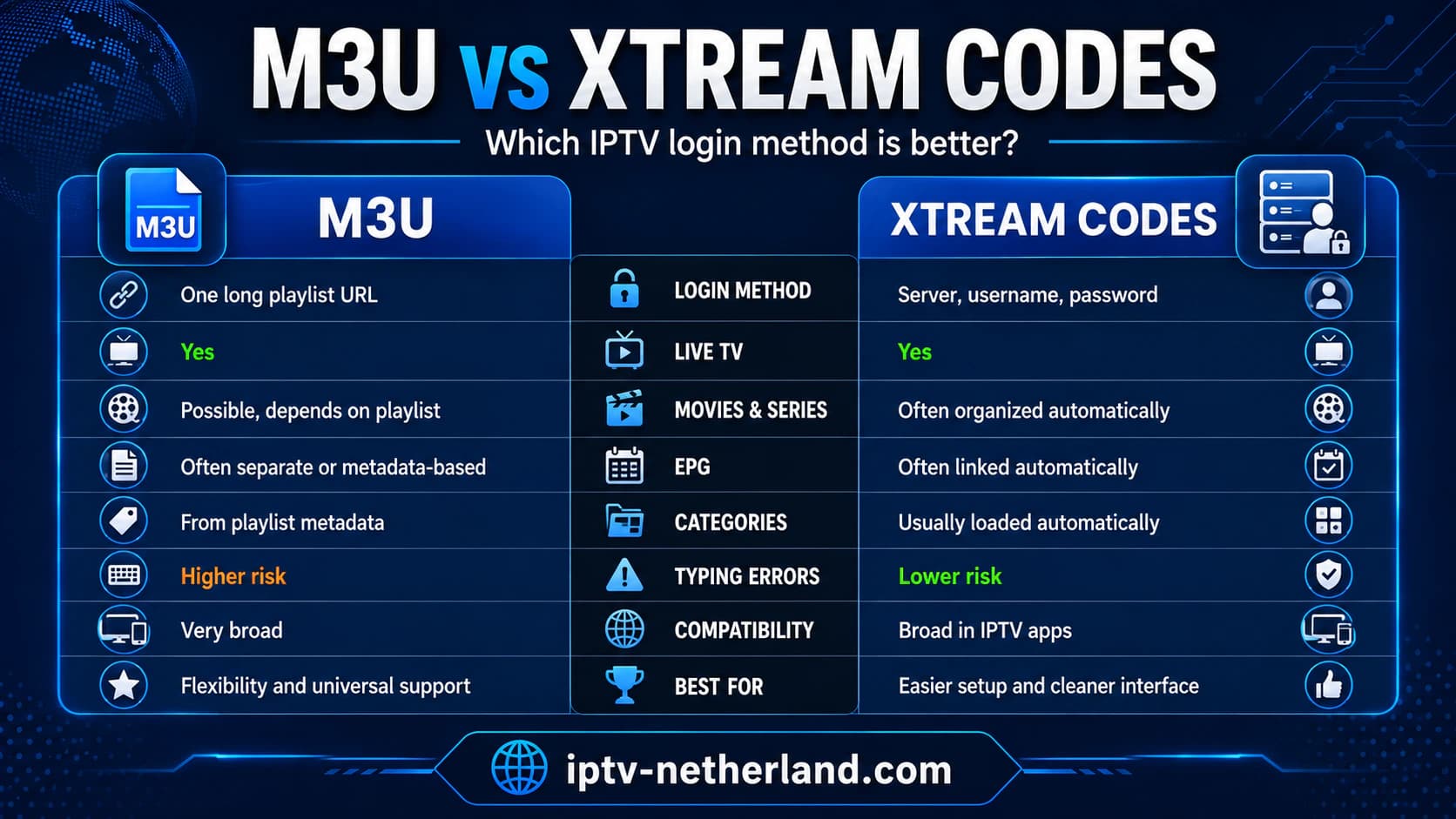
M3U vs. Xtream Codes
Both methods may provide access to the same service, but the user experience differs.
When Should You Choose M3U?
M3U is useful when:
- the app does not support Xtream Codes;
- you want a universal playlist;
- you use VLC;
- you want to edit the list yourself;
- you want to combine several sources;
- you need only live streams.
When Should You Choose Xtream Codes?
Xtream Codes is often more convenient when:
- you want live TV, movies, and series separated;
- the app should load categories automatically;
- the EPG should be linked automatically;
- you want a shorter and clearer login;
- the provider officially supports it.
Our practical preference:
Use Xtream Codes when both the provider and app support it well. Use M3U when you need flexibility or broad compatibility.
M3U vs. Stalker Portal
Stalker Portal works differently.
Portal access may be connected to:
- MAC address;
- device ID;
- portal URL;
- a specific receiver.
M3U is normally easier to transfer between several applications.
Stalker Portal may offer stronger integration with a specific box or interface.
Choose the method supported by your provider and suited to your device.
Never change a MAC address without understanding how the account is linked.
How Do You Add an EPG to an M3U Playlist?
EPG stands for Electronic Program Guide.
It contains program information such as:
- program title;
- start and end time;
- description;
- channel ID;
- sometimes images.
With an M3U login, you may receive a separate XMLTV link.
It may look like this:
http://example-server.com/xmltv.php?username=USER&password=PASSWORDAdd EPG in TiviMate
- Open Settings.
- Go to EPG.
- Choose Add EPG Source.
- Paste the XMLTV link.
- Assign the source to the playlist.
- Start an update.
- Wait for the data to be processed.
Why Is the EPG Empty?
Possible causes include:
- incorrect EPG link;
- expired account;
- source temporarily offline;
- incorrect device date or time;
- incorrect
tvg-id; - channel names do not match;
- EPG source is not linked to the playlist;
- the app has not finished synchronizing.
The app cannot create program information when the source does not provide it.
Can an M3U Playlist Contain Movies and Series?
Yes.
An M3U playlist can point to:
- live channels;
- movies;
- episodes;
- radio;
- camera streams;
- personal video files.
How the app displays this content depends on the metadata.
A simple M3U player may place everything in one long list.
A specialized IPTV app may recognize categories and display movies or series separately.
Xtream Codes normally provides a clearer separation between live TV, movies, and series.
Can One M3U Link Be Used on Several Devices?
Technically, you can often enter the same link in several applications.
That does not mean you are allowed to watch on all of them at the same time.
The provider controls:
- number of permitted devices;
- number of simultaneous streams;
- IP restrictions;
- geographic restrictions;
- account policy.
A one-connection subscription may stop when a second device starts playing.
Before purchasing, ask:
- how many devices may be configured;
- how many streams may run simultaneously;
- whether recording counts as another connection;
- whether multiview uses several connections.
Read our guide: Buying an IPTV subscription: 10 tips before you pay.
Is an M3U Link Safe?
An M3U link may contain sensitive account information.
If another person obtains the complete link, they may be able to:
- load your channel list;
- open streams;
- use your connection allowance;
- cause the account to be blocked;
- read your username and password.
Do Not Share the Link Publicly
Do not post it in:
- forums;
- screenshots;
- public GitHub repositories;
- social media;
- video descriptions;
- public cloud notes;
- support groups with unknown participants.
Be Careful With Screenshots
A screenshot of app settings may reveal the entire URL.
Hide the sensitive parts before sharing the image.
Use Trustworthy Apps
An unknown app may send the playlist to an external server.
Install IPTV apps preferably through:
- Google Play;
- Apple App Store;
- Samsung App Store;
- LG Content Store;
- the developer’s official website.
Avoid cracked or modified APK files.
Can an M3U Link Expire?
Yes.
A link may stop working when:
- the subscription expires;
- the password changes;
- the server moves;
- the provider disables the account;
- the URL is replaced;
- the maximum number of connections is exceeded;
- the IP address is temporarily blocked.
Some links also contain a temporary token.
In that case, a previously saved URL may stop working after a set period.
Ask the provider whether the link remains active for the full subscription or needs to be renewed periodically.
Why Does the M3U Playlist Not Load?
These are the most common causes.
1. The Link Was Copied Incorrectly
Check:
- beginning and end;
- username;
- password;
- port;
- special characters;
- extra spaces.
2. The Subscription Has Expired
Ask the provider to confirm the account status.
3. The Server Is Temporarily Offline
Try again later or on another network.
4. The App Does Not Handle the Format Well
Try VLC or another reliable IPTV app.
5. The Playlist Is Too Large
A very large playlist may slow an older Smart TV or app.
Ask for a smaller country- or category-specific list when available.
6. DNS or Domain Problem
Check whether the server address can be reached.
A different DNS server may help when the domain is not resolving, but it does not directly increase video bandwidth.
7. The Account Is Active Elsewhere
Close the app on other devices.
8. IP Blocking
Some services restrict sudden switching between networks or countries.
Contact the provider.
The Channel List Loads, but Streams Do Not Play
The playlist itself is probably working, but the app cannot open the video.
Possible causes include:
- source stream offline;
- decoder issue;
- unsupported codec;
- account connection limit;
- unsupported output format;
- unstable connection;
- VPN issue;
- server load.
Test:
- Another channel.
- Another category.
- Another decoder.
- An external player.
- Ethernet.
- Another app.
- Another device.
- A mobile hotspot.
If only one channel fails, the source is probably the problem.
If nothing works, check the login, account status, and server.
Use our complete guide: IPTV not working.
M3U IPTV Buffers: Is the Playlist the Problem?
The playlist determines where the stream is located, but buffering may have several causes.
Examples include:
- weak Wi-Fi;
- packet loss;
- high server load;
- excessive bitrate;
- old TV box;
- incorrect decoder;
- unsuitable buffer size;
- another device downloading;
- account active on several devices;
- poor route to the server.
Changing M3U apps does not automatically change the source.
However, another app may handle the following differently:
- decoder;
- reconnection;
- buffer;
- HLS;
- MPEG-TS;
- subtitles.
For Full HD, keep approximately 15 to 25 Mbps of stable available speed per stream. For 4K, keep 35 to 50 Mbps or more available.
Read What internet speed do you need for IPTV?.
Can You Edit an M3U Playlist?
Yes.
An M3U file is text-based.
You can open it in a text editor and:
- remove channels;
- change the order;
- edit groups;
- rename channels;
- replace logos;
- add personal streams.
Be Careful With Online Editors
An online playlist editor can see your complete M3U link and account details.
Use only a trustworthy service or edit the file locally.
Create a Backup First
A small syntax error can break categories or streams.
Always keep the original file.
Dynamic Link vs. Local File
When you download an online M3U link and edit it locally, you may no longer receive automatic updates.
New channels added by the provider will not appear automatically.
Can M3U Be Combined With Another Playlist?
Technically, you can merge several M3U files.
This may be useful for:
- personal radio;
- your own camera streams;
- lawful public streams;
- several services;
- local media files.
Be aware of:
- duplicate channels;
- conflicting groups;
- different EPG IDs;
- expired URLs;
- security risks;
- licensing terms.
TiviMate Premium can manage several playlists separately, so merging is often unnecessary.
M3U on Samsung TV
Samsung uses Tizen.
You need a native Tizen application that supports M3U.
Available apps differ by model, year, and region.
The general process is:
- Install a suitable app from the Samsung App Store.
- Note the device ID or MAC address if the app uses one.
- Add the M3U link through the app or its official portal.
- Restart the app.
- Check the playlist.
Enter your M3U link only on the official website associated with the application.
For more options, read IPTV app for Samsung TV.
M3U on LG TV
LG uses webOS.
You also need a compatible native app.
The app may ask for:
- M3U link;
- playlist name;
- device ID;
- MAC address;
- activation code.
The exact procedure differs between players.
Use only the official app and official upload portal.
Read our guide: IPTV app for LG TV.
M3U on Android TV or Google TV
Android TV and Google TV usually provide the easiest M3U experience.
Useful options include:
- TiviMate;
- IPTV Smarters Pro;
- Televizo;
- VLC;
- other well-reviewed TV players.
For everyday live-TV use, TiviMate is often the most advanced option.
If your television does not run Android TV, connect an external box.
See our comparison of the best IPTV boxes.
M3U on a Phone or Tablet
Mobile IPTV players exist for Android and iOS.
Check:
- developer;
- privacy policy;
- permissions;
- advertisements;
- app costs;
- supported login methods.
A mobile media player does not normally need access to contacts, text messages, or call history to play a playlist.
Do not store the M3U link in insecure messages or public notes.
M3U on Windows and macOS
On a computer, you can use:
- VLC;
- Kodi;
- suitable IPTV desktop apps;
- web players from trustworthy services.
VLC is the easiest option for a quick test.
For a full television interface, a specialized app is normally more comfortable.
With web players, check whether the playlist is uploaded to an external server.
Is Free M3U IPTV Safe?
Be careful with websites advertising “free premium M3U playlists.”
Possible risks include:
- unauthorized streams;
- malware;
- phishing;
- aggressive advertisements;
- stolen accounts;
- unreliable URLs;
- tracking;
- channels disappearing quickly;
- links pointing to harmful files.
A lawful public stream can be distributed through M3U.
The issue is not the format, but the source and content rights.
Prefer:
- official public broadcasters;
- your own streams;
- trustworthy lawful providers;
- playlists with a clear origin.
Is M3U IPTV Legal?
M3U is a technical playlist format and is legal.
The legal question concerns the content.
Examples of lawful use include:
- personal media files;
- internal company streams;
- public camera streams with permission;
- official radio and television streams;
- subscriptions with distribution rights.
Problems arise when protected channels, movies, or sports are distributed without authorization.
An extremely cheap package containing almost every premium channel and new movie in the world should make you cautious.
Read Buying an IPTV subscription: 10 tips before you pay before purchasing.
M3U IPTV and Privacy
An app may be able to see:
- server address;
- username;
- password;
- channel selections;
- device model;
- IP address;
- usage times.
Check:
- privacy policy;
- developer;
- source of the app;
- requested permissions;
- reputation;
- update history.
Do not use a modified “Premium unlocked” APK.
Such an app may collect your playlist details.
Should You Use a VPN With M3U IPTV?
Not by default.
A VPN may be useful as a diagnostic test when the route between your internet provider and the server performs poorly.
However, a VPN may also:
- reduce speed;
- increase latency;
- block the stream;
- overload a weak TV box;
- create instability.
Test the same channel with and without the VPN.
Use a nearby VPN server.
A VPN does not make unauthorized content lawful.
Common M3U IPTV Mistakes
Typing the Link Manually
One small error can make the URL unusable.
Paste it when possible.
Sharing the M3U Link Publicly
The link may contain your login.
Confusing the App With the Provider
The app does not automatically supply channels.
Expecting the EPG to Work Automatically
A separate EPG source may be required.
Using Too Many Devices at Once
The account connection limit may be exceeded.
Testing Only During the Day
Evening performance may be different.
Installing an Unknown APK
Your playlist details may be stolen.
Assuming “FHD” Always Means Genuine Full HD
Check the actual picture quality.
Loading a Huge Playlist on an Old TV
This may make the app slow.
Treating DNS as a Speed Upgrade
DNS may improve name resolution, but it does not create extra bandwidth.
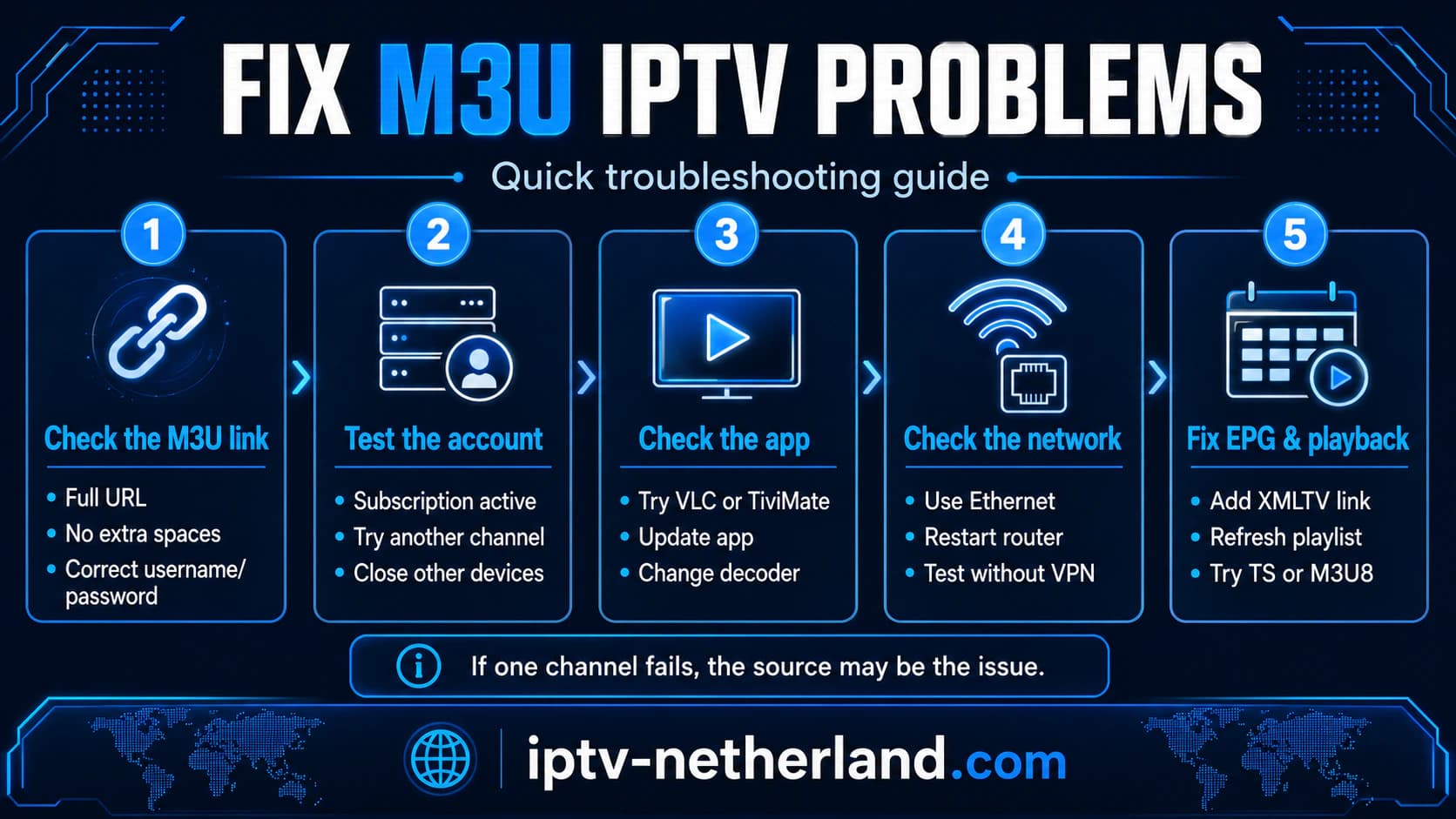
Troubleshooting: Quick Decision Guide
Playlist Does Not Open
Check:
- complete link;
- account status;
- server;
- app;
- network.
Playlist Opens but Is Empty
Check:
- playlist type;
- file size;
- category filters;
- server response;
- expired login.
Channels Appear but Do Not Play
Check:
- another channel;
- decoder;
- output format;
- connection limit;
- source server.
EPG Is Empty
Check:
- XMLTV link;
tvg-id;- date and time;
- source assignment;
- EPG update.
Problems Occur Only in the Evening
Test:
- Ethernet;
- another channel;
- another app;
- another source;
- hotspot;
- server load.
Works on Phone but Not on TV
Possible causes include:
- codec;
- app;
- television hardware;
- Wi-Fi;
- incorrect input;
- outdated software.
Which App Is Best for M3U IPTV?
There is no single best app for everyone.
TiviMate
Best for:
- Android TV;
- live television;
- advanced EPG;
- favorites;
- channel groups;
- multiple playlists;
- recording;
- multiview.
IPTV Smarters Pro
Best for:
- beginners;
- clear home screen;
- live TV, movies, and series;
- several device types.
VLC
Best for:
- quick testing;
- computers;
- simple playlist checking.
Native Smart TV App
Best when:
- you do not want an external box;
- the app is properly supported;
- the television is fast enough.
Compare the two main television players in TiviMate vs IPTV Smarters Pro.
Should You Ask the Provider for M3U or Xtream Codes?
Ask for both when possible.
Xtream Codes is often easier for:
- movies;
- series;
- categories;
- EPG;
- shorter login details.
M3U is useful for:
- VLC;
- broad compatibility;
- local editing;
- apps without Xtream Codes;
- backup access.
Do not automatically use both on separate devices at the same time when your account permits only one connection.
Frequently Asked Questions
What Is M3U IPTV?
M3U IPTV means using an M3U playlist to load television channels and other streams into a media player.
How Do I Use an M3U Link?
Copy the complete link and add it through the M3U or playlist option of a supported app.
Is M3U the Same as Xtream Codes?
No.
M3U normally uses one long playlist URL. Xtream Codes uses a server address, username, and password through an API login.
Which Apps Can Open M3U IPTV?
Examples include TiviMate, IPTV Smarters Pro, VLC, and several Smart TV players.
Can I Use an M3U Link in TiviMate?
Yes.
Choose Add Playlist, select M3U, and enter the complete URL.
Can I Use M3U on Samsung TV?
Yes, when you use a compatible native Tizen app.
Can I Use M3U on LG TV?
Yes, with a suitable webOS app.
Why Does My M3U Link Not Work?
Possible causes include a typing error, expired account, offline server, too many active connections, app issue, or IP blocking.
Why Is My EPG Empty?
The XMLTV link may be missing, the tvg-id may not match, or the EPG source may not be linked to the playlist.
Can I Share My M3U Link?
Do not share it.
The link may contain your username and password.
Can I Use the Same M3U Link on Two Televisions?
You may be able to configure it on both devices, but simultaneous viewing depends on the permitted connection count.
Is an M3U Link Permanent?
Not always.
It may stop when the subscription expires, the server changes, or the account is disabled.
Is M3U Free?
The format itself is free.
The streams or service referenced by the playlist may be free or paid.
Is Free M3U IPTV Legal?
It depends on the rights to the streams.
An official public stream may be lawful. A playlist containing unauthorized premium content probably is not.
What Is type=m3u_plus?
It normally indicates that the playlist contains extra metadata such as categories, logos, and EPG IDs.
Which Is Better: output=ts or output=m3u8?
It depends on the app, server, and connection.
TS is widely used for live TV. M3U8/HLS may recover better from some brief network interruptions but can increase delay.
Can I Edit an M3U File Myself?
Yes.
It is a text file. Create a backup first and protect any sensitive login URLs.
Does M3U Need a Separate EPG?
Often, yes.
Some playlists contain EPG identifiers, but a separate XMLTV source is common.
How Fast Should the Internet Be?
Keep approximately 15 to 25 Mbps available for one Full HD stream and 35 to 50 Mbps for one 4K stream.
Can a VPN Improve M3U IPTV?
Sometimes a VPN can bypass a poor route, but it may also slow the stream.
Conclusion: M3U Is Flexible, but Treat the Link Like a Password
M3U IPTV is popular because it is simple and widely supported.
With one link, you can load a complete channel list into TiviMate, IPTV Smarters Pro, VLC, or a compatible Smart TV app.
The most important points are:
- M3U is a playlist, not an app or subscription.
- The link may contain your login.
- Do not share the link publicly.
- Xtream Codes is often easier for movies, series, and EPG.
- A separate XMLTV link may be required.
- The app, device, server, and connection determine the experience together.
- The format is legal; the rights to the content determine whether the service is lawful.
- Test a subscription on your own device and network first.
At iptv-netherland.com, we help customers not only access IPTV but also complete the installation and configuration of their devices.
Would you like to test an M3U link on your own television or IPTV box first?
Compare our IPTV subscriptions, view the Dutch IPTV channel list, or request a free trial account.
This allows you to check whether the playlist, app, EPG, and picture quality work properly before choosing a longer subscription.
Written by
IPTV Netherland Editorial Team
IPTV setup and streaming support
Our editorial team writes practical IPTV guides for viewers in the Netherlands, with a focus on device setup, stable streaming, app configuration, and clear troubleshooting steps.
Useful IPTV resources
Continue with the most relevant setup, channel, and subscription pages.